
How to Sell Monthly Subscription Products in WooCommerce (Step-by-Step Guide)
March 5, 2025
Subscription-based products are one of the most profitable eCommerce models today. Instead of relying only on one-time purchases, you can generate predictable monthly revenue by charging customers automatically for products, services, or digital access.
With WooCommerce, you can easily sell subscription products like:
Membership websites
SaaS or digital tools
Monthly product boxes
Online courses or communities
Website maintenance services
Subscriptions are popular because they create predictable recurring income and improve customer loyalty. Customers enjoy convenience while businesses benefit from stable cash flow.
In this guide, you’ll learn how to sell monthly subscription products in WooCommerce step by step.
Why Sell Subscription Products in WooCommerce?
Before jumping into the setup, let’s look at why subscription models work so well.
1. Predictable Recurring Revenue
Subscriptions generate automated recurring payments, allowing store owners to forecast revenue more accurately.
2. Higher Customer Lifetime Value
Subscribers tend to stay longer than one-time buyers, increasing the overall value of each customer.
3. Better Customer Retention
Instead of constantly finding new customers, subscriptions encourage long-term relationships.
4. Automated Payments
Once customers subscribe, renewals can be charged automatically through supported payment gateways.
What You Need Before Selling Subscriptions
To start selling monthly subscriptions in WooCommerce, make sure you have the following:
A WordPress website
WooCommerce installed
SSL enabled (HTTPS)
A payment gateway supporting recurring billing (Stripe, PayPal, etc.)
A WooCommerce subscription plugin
WooCommerce itself does not include subscription functionality by default, so you need a plugin to enable recurring billing and subscription product types.

Step 1: Install a WooCommerce Subscriptions Plugin
The first step is installing a plugin that enables subscription features in WooCommerce. The plugin called Easy subscriptions gets the job done. It allows you to:
Create recurring billing plans
Set monthly, weekly, or yearly cycles
Offer free trials
Manage subscribers
Automate renewals
After installing your subscription plugin:
Go to WordPress Dashboard
Click Plugins → Add New
Upload or install your subscription plugin
Click Activate
Step 2: Create a New Subscription Product
Once the plugin is activated, you can create subscription products just like regular WooCommerce products.
Steps:
Go to Products → Add New
Enter the product name
Add product description
Upload product images
Click the subscriptions checkbox
Most plugins support:
Simple Subscription – one recurring plan
Variable Subscription – multiple plans (e.g., monthly & yearly)

Step 3: Configure the Monthly Billing Plan
Now configure how the subscription works.
Inside the Product Data section:
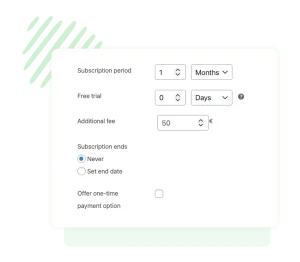
Set the following:
Subscription price (example: $29)
Billing interval (monthly)
Subscription length (optional)
Sign-up fee (optional)
Free trial period (optional)
Easy subscription systems allow flexible billing periods such as weekly, monthly, or yearly depending on the product.
Step 4: Enable Recurring Payment Gateways
To charge customers automatically each month, you must enable a payment gateway that supports recurring billing.
Common options include:
Stripe
PayPal
Authorize.net
Square
To configure:
Go to WooCommerce → Settings
Click Payments
Enable your preferred gateway
Connect your payment account
Recurring payments will now be processed automatically at each billing cycle.
Tips to Increase Subscription Conversions
Offer Free Trials
Let customers test your product before committing.
Provide Tiered Plans
Example:
Basic – $9/month
Pro – $29/month
Business – $79/month
Show Subscription Benefits Clearly
Highlight what subscribers receive each month.
Use Annual Discounts
Encourage longer commitments with yearly plans.
Selling subscription products with WooCommerce is one of the best ways to build recurring revenue and long-term customer relationships.
With the right setup, you can automate billing, manage subscribers easily, and grow a predictable income stream.
