
How to Reduce Failed Payments in WooCommerce Subscription Stores
March 9, 2025
Subscription-based WooCommerce stores rely on one critical factor: consistent recurring payments. When those payments fail, revenue drops, churn increases, and customer relationships can suffer.
Unfortunately, failed payments are common in subscription businesses. Studies show that recurring payments can have decline rates of 15–30%, which means a large portion of your subscription revenue can silently disappear without proper recovery systems.
The good news? Most failed subscription payments are recoverable or preventable if your WooCommerce store is set up correctly.
In this guide, we’ll explore why subscription payments fail and how you can reduce them to protect your recurring revenue.
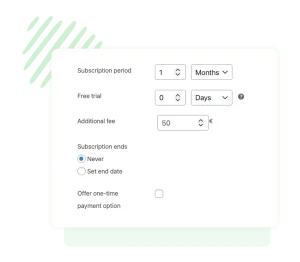
If you’re running a subscription store and want better control over recurring payments, the Easy Subscriptions Plugin helps store owners manage subscriptions, recurring billing, and customer accounts more reliably.
Why WooCommerce Subscription Payments Fail
Before fixing the issue, it’s important to understand the common causes.
1. Expired or Replaced Credit Cards
Customers often forget to update their payment details when their cards expire or are replaced. This is one of the most frequent causes of failed recurring payments.
2. Insufficient Funds or Bank Declines
Sometimes the card is valid, but the bank temporarily declines the charge due to insufficient funds or fraud protection rules.
3. Payment Gateway Misconfiguration
Incorrect API keys, disabled webhooks, or wrong gateway settings can cause subscription renewals to fail silently.
4. Missing or Invalid Payment Tokens
WooCommerce subscriptions rely on stored payment tokens to process automatic renewals. If these tokens become invalid, payments will fail.
5. Lack of Payment Retry Logic
Without automated retries, a single failed payment can immediately lead to lost revenue and involuntary churn.
7 Proven Ways to Reduce Failed Payments in WooCommerce
1. Enable Smart Payment Retries
Many failed payments succeed if retried later. Temporary issues like insufficient funds can resolve within a few days.
Smart retry schedules can recover a significant percentage of failed payments automatically.
2. Send Automatic Failed Payment Notifications
Customers often don’t realize their payment failed.
Automated email notifications allow them to quickly update their payment details and avoid subscription cancellation.
3. Make Updating Payment Methods Easy
Your customers should be able to update their payment information easily through their account dashboard.
A smooth user experience dramatically improves recovery rates.
4. Choose Subscription-Friendly Payment Gateways
Payment gateways like Stripe and PayPal offer advanced features for subscription billing, including tokenization and automated card updates.
5. Monitor Subscription Renewal Logs
Regularly reviewing WooCommerce logs helps identify issues with gateways, payment tokens, or API connections before they cause major problems.
6. Simplify Your Subscription Plans
Complex billing structures increase the chance of errors. Clear pricing and simple billing cycles improve both technical reliability and customer trust.
7. Use a Dedicated Subscription Management Tool
Managing subscriptions with limited tools can increase the risk of failed payments.
Using a dedicated solution helps automate recurring billing, improve subscription management, and create a smoother experience for customers.

Failed payments are one of the biggest hidden challenges in subscription-based WooCommerce businesses. Even a small failure rate can translate into significant lost revenue.
By implementing smart retry systems, improving payment management, and using dedicated subscription tools, you can dramatically reduce failed payments and protect your recurring revenue.
