
How to Add Subscription Products to WooCommerce Without the Official WooCommerce Subscriptions Plugin
March 10, 2025
Subscription products are one of the most powerful ways to create predictable recurring revenue for your WooCommerce store. Instead of relying only on one-time purchases, subscriptions allow customers to pay automatically on a recurring basis (monthly, weekly, or yearly).
However, WooCommerce doesn’t include subscription functionality out of the box. Store owners typically need to install additional extensions to enable recurring payments and automated renewals.
The problem?
The official WooCommerce Subscriptions plugin costs around $279 per year, which can be expensive for small businesses, startups, and growing stores.
The good news is that you can add subscription products to WooCommerce without the official plugin by using alternative solutions that offer similar features, often at a lower cost or with more flexibility.
Why Sell Subscription Products in WooCommerce?
Before diving into the setup process, it’s important to understand why subscriptions are so popular in ecommerce.
1. Predictable Revenue
Subscriptions generate recurring income every billing cycle, helping businesses forecast revenue and manage cash flow more effectively.
2. Better Customer Retention
It’s usually cheaper to retain existing customers than acquire new ones. Subscription models encourage long-term customer relationships.
3. Automation
Recurring billing automates the purchasing process so customers don’t need to reorder manually every month.
Common subscription examples include:
Coffee or meal boxes
Digital memberships
SaaS tools
Online courses
Fitness programs
Maintenance services
Can WooCommerce Handle Subscriptions Without a Plugin?
Technically, no. WooCommerce core doesn’t support recurring payments by default.
To create subscription products you need an extension that can:
Create recurring billing schedules
Process automatic renewals
Manage subscription status
Handle cancellations and upgrades
Luckily, Easy subscriptions exists, which allow you to add subscriptions without buying the official extension.

Add WooCommerce Subscriptions With an Alternative Plugin
Instead of using the official WooCommerce extension, you can install a lightweight subscription plugin that adds recurring payment functionality.
These plugins typically support:
Recurring billing cycles
Free trials
Signup fees
Variable subscription plans
Automatic renewals
Payment gateway integrations
Step 1: Install a WooCommerce Subscription Plugin
First, install a subscription plugin that enables recurring payments.
A good subscription plugin should allow you to:
Convert simple products into subscription products
Set billing intervals (weekly, monthly, yearly)
Add free trials
Manage renewals automatically
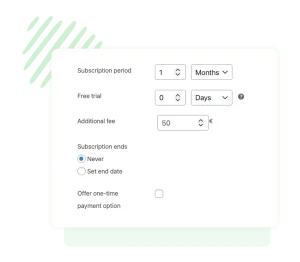
Step 2: Create a Subscription Product

Step 3: Configure Recurring Payments
To automate renewals, connect a payment gateway that supports recurring billing.
Common gateways include:
Stripe
PayPal
Authorize.net
Once enabled, customers will be automatically charged based on the billing schedule you defined.
Subscription products are one of the most powerful ways to build predictable revenue and long-term customer relationships in WooCommerce.
Although WooCommerce does not support subscriptions by default, you don’t need the expensive official extension to launch recurring billing.
With the right plugin, you can quickly add subscription functionality, automate renewals, and create flexible pricing plans for your customers.
If you’re looking for a simple way to implement subscriptions, the Appalify WooCommerce Subscriptions Plugin provides everything you need to get started.
